 In this informative article, Kevin Bharmal, founder and prepress director at Alpha Prepress, outlines the true cost of a colour mismatch across wide-format panels and how this can be avoided.
A colour mismatch between the panels of a wide-format graphic is created in production and discovered at installation, which is the most expensive place to find any print defect.
Two panels match reliably when they are produced under one colour condition: the same device, the same settings, the same media lot and the same time window or verified against a known reference when that is not possible. The mismatches we see trace back to jobs that were split across production conditions without anyone deciding it and that makes this a planning problem before it is a printing problem. Planning problems can be caught at the prepress desk, before the first panel is printed.
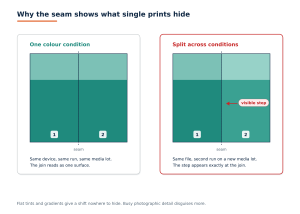
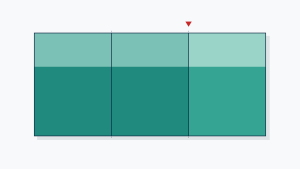
Two panels produced under one colour condition read as one surface. The same file, with the second panel printed in a later run on a new media lot, shows a visible step at the join
Why the seam shows what single prints hide
Print two copies of the same file a week apart and hang them in different rooms and a small colour difference between them can pass without comment. But the same two prints together as panels of one graphic and the same difference can read as a defect running the full height of the graphic.
The seam is what changes. It removes every buffer the eye normally gets: no gap, no frame and no distance between the two printed areas, only a hard edge where one becomes the other. People are far better at comparing colours in direct contact than at remembering a colour across a room, so a difference that survives memory can fail at the join.
Distance does not rescue it either. Fine detail disappears at normal viewing distance, but a tonal step at a seam runs the full height of the graphic and an edge between two areas of colour stays detectable long after the detail inside them has gone.
Content matters as much as distance. Flat tints, neutral greys and smooth gradients give a shift nowhere to hide, while busy photographic detail disguises far more. A failure we repeatedly see in incoming files is a panel split placed through exactly the wrong content: seams running through a long gradient or a large field of flat brand colour, where any production variation reads as a stripe.
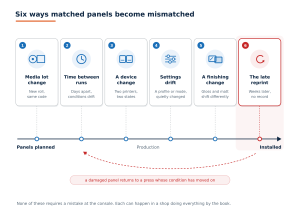
From a media lot change during production to a late reprint after installation. None of these requires a mistake at the console
Six ways matched panels become mismatched
None of these requires a mistake at the console. Each can happen in a shop doing everything by the book, which is why the fix is a plan and a record, not more care.
- A media lot change: Two rolls of the same material ordered under the same code, can differ in base tint, coating and brightness and the same ink can sit on them differently. A graphic that starts on one roll and finishes on another has crossed a production condition without a single setting changing.
- Time between runs: Head condition, ink temperature, heater behaviour and the ambient environment all drift. Two panels printed days apart on the same device are printed under two conditions that happen to share a serial number.
- A device change: Splitting one graphic across two printers to hit a deadline splits it across two colour states, even when the machines are the same model and were profiled in the same week.
- Settings drift: A profile updated mid-job, a different print mode or pass count or colour settings that did not travel with the file can separate two panels as effectively as a different machine.
- A finishing change: Laminate can change the colour beneath it. A gloss and a matt finish shift the same print in different directions and laminate applied to one panel and not its neighbour or drawn from a different batch, can create a mismatch after the printing matched.
- The late reprint: This is one of the most difficult cases to control. One panel is damaged on site and reprinted weeks later, against neighbours that have already had light exposure, on a media lot that may no longer exist. We regularly see reprint requests arrive with no record of the profile, print mode or media lot of the original run, which turns a one-panel reprint into a matching exercise with no reference.
What a mismatch actually costs
A mismatch that escapes the shop is found on the wall, at installation or at handover and the location is what makes it expensive.
The reprint is only the start and its scope can grow. A single panel cannot always be matched in isolation. If the original production condition no longer exists, matching one new panel to its old neighbours can be harder than reprinting the pair and in a flat-colour design, the set. Any laminate or mounting already committed goes with it.
Then come the costs, no press waste log records: the installation crew’s return visit, access equipment hired a second time, another access window agreed with the site or the venue, a delayed handover and a client who now inspects every seam on the next job. On exterior and high-level work the access costs can outweigh the print itself and a second mobilisation doubles them.
There is no meaningful industry average for what this adds up to, because every installation is different, so this article does not offer one. The useful number is the cost of one mismatch on your own typical job, counted from the reprint through the second visit to the delayed handover. Set that figure against what the controls below cost, which is mostly minutes of planning and one measured strip per run.
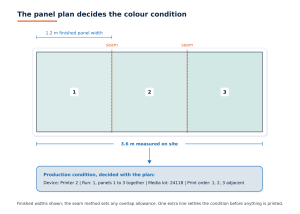
One extra line on the panel plan records the device, run, media lot and print order before anything is printed. Finished widths are shown; the seam method sets any overlap allowance
The prepress controls that prevent it
- Decide the production condition when the panels are planned. The panel plan already sets widths, overlaps and seam positions. Give it one more line: which device, which run and which media lot the panels will be produced under. Adjacent panels belong in the same run, on the same device, from the same roll wherever the job allows and where it does not allow it, the exception should be a recorded decision, not an accident of scheduling.
- Nest neighbours near each other: Even inside one run, panels printed at opposite ends of a long queue are further apart in time than panels printed back to back. Where the layout allows, keep adjoining panels adjacent in the print order, so any slow drift across the run lands between graphics instead of inside one.
- Verify the run, not the calendar: A calibration date says the device was in a known state then. A control strip printed and measured with the job says it is in a known state now. Frameworks such as ISO/TS 15311 and the Fogra ProcessStandard Digital treat colour consistency across a run as a measurable property, not a matter of opinion. The tolerance that matters is the one agreed with the client and measuring at all is what separates a controlled run from a hopeful one.
- Place seams where variation can hide: Seam position is a design-stage decision with a colour consequence. A seam at a natural boundary in the image forgives a small shift. A seam through a gradient or a flat tint forgives nothing. When the design offers no safe position, say so before printing, not after installation.
- Proof the composite: A proof of each panel confirms each panel. Only a composite proof, with the seams marked, shows whether the transitions cross content that will expose them.
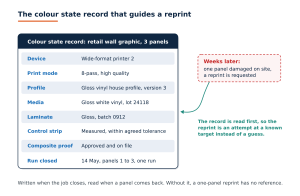
Written when the job closes and read when a damaged panel comes back weeks later, so the reprint starts from a known target instead of a guess
Plan the reprint before you need it
Record the colour state of every multi-panel job when it closes: the device, the profile and its version, the print mode, the media lot and the measured values from the run’s control strip. That record is what makes a later reprint an attempt at a known target instead of a guess.
Be honest in the quote as well. A reprint produced months later, on a new media lot, beside panels that have been on a wall in daylight, may not match however good the record is. Where that risk is real, the defensible answer can be to quote the reprint as a pair or a set and to say why. That conversation is easier before production than in front of the wall.
A pre-production colour checklist for multi-panel jobs
- Adjacent panels assigned to one device, one run and one media lot or the exception recorded.
- Media lot number written on the job.
- Device, print mode and profile version written on the job.
- Control strip printed and measured with the run.
- Laminate type and batch consistent across adjoining panels.
- Seam positions reviewed against gradients and flat tints.
- Composite proof approved with the seams marked.
- Colour state archived for future reprints.
The cheapest panels to match are the ones planned to match
The colour condition a graphic is produced under is decided in planning, not discovered at installation. The checks above cost minutes and a test strip. The mismatch can cost a reprint, a return installation visit and a harder conversation. Plan the condition with the panels, verify it with the run and record it for the reprint, and the seam becomes a line the installer covers instead of one the client photographs.